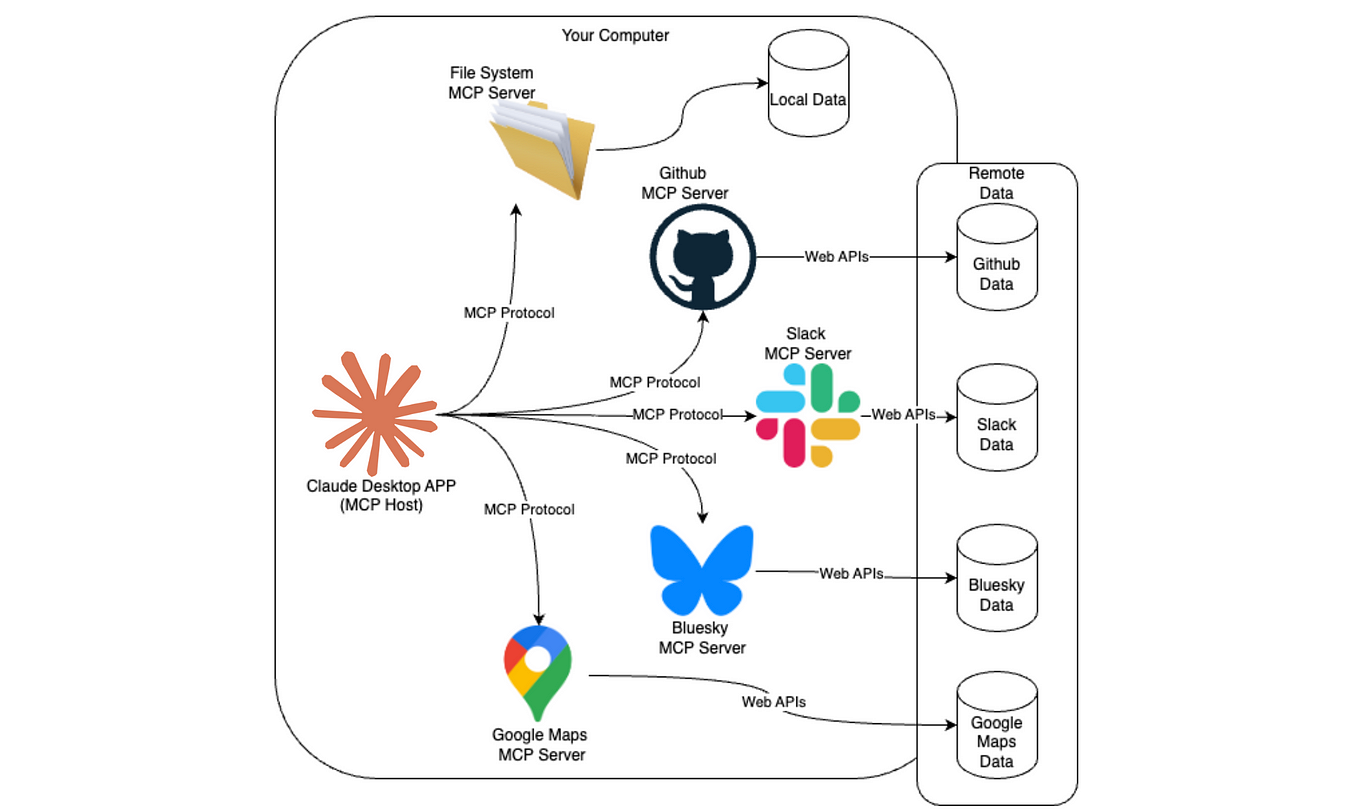
Model
Communication Protocol (MCP): A Unified Approach to Interacting with LLMs
With the explosion of Large Language Models (LLMs) like OpenAI’s GPT,
Anthropic’s Claude, Meta’s LLaMA, and Google’s Gemini, developers are facing
the challenge of working with various APIs, data formats, and SDKs. Model Communication Protocol (MCP)
provides a standardized layer to communicate with different LLMs through a
single, unified interface.
In this article, we’ll explore:
·
What is MCP?
·
How to create an MCP server
·
How to integrate various LLMs (OpenAI, Claude,
Gemini, etc.)
·
Real-life applications of MCP
·
Complete working code using FastAPI
What is MCP?
MCP (Model Communication Protocol) is a lightweight protocol that standardizes how
we send prompts and receive responses from LLMs. Think of it like a universal
translator or an API gateway for AI models.
MCP typically supports:
- Standardized request/response format
- Routing to the appropriate LLM backend
- Middleware for logging, caching, or
pre-processing
- Model abstraction layer
How to Create
an MCP Server
We'll use FastAPI to build the MCP server.
Directory
Structure
mcp-server/
├──
main.py
├──
llms/
│ ├── openai_llm.py
│ ├── claude_llm.py
│ ├── gemini_llm.py
│ └── llama_llm.py
└──
models/
└── schema.py
Step 1:
Install Dependencies
pip install fastapi uvicorn openai anthropic
google-generativeai
Step 2: Define
Schema
models/schema.py
from pydantic import BaseModel
from typing import Optional
class MCPRequest(BaseModel):
model_provider: str # openai,
claude, gemini, llama
prompt:
str
temperature: Optional[float] = 0.7
max_tokens: Optional[int] = 300
class MCPResponse(BaseModel):
response: str
Step 3: LLM
Provider Wrappers
Each LLM has a unique SDK and call format. We
wrap them.
llms/openai_llm.py
import openai
openai.api_key = "your-openai-key"
def chat(prompt, temperature=0.7, max_tokens=300):
completion = openai.ChatCompletion.create(
model="gpt-3.5-turbo",
messages=[{"role": "user", "content":
prompt}],
temperature=temperature,
max_tokens=max_tokens
)
return
completion.choices[0].message["content"]
llms/claude_llm.py
import anthropic
client = anthropic.Anthropic(api_key="your-claude-key")
def chat(prompt, temperature=0.7, max_tokens=300):
response = client.messages.create(
model="claude-3-opus-20240229",
messages=[{"role": "user", "content":
prompt}],
max_tokens=max_tokens,
temperature=temperature
)
return
response.content[0].text
llms/gemini_llm.py
import google.generativeai as genai
genai.configure(api_key="your-gemini-key")
def chat(prompt, temperature=0.7, max_tokens=300):
model =
genai.GenerativeModel("gemini-pro")
response
= model.generate_content(prompt)
return
response.text
llms/llama_llm.py (Local inference or llama.cpp-style)
def chat(prompt, temperature=0.7, max_tokens=300):
#
Placeholder for local inference logic
return f"Local
LLaMA says: {prompt}"
Step 4: Create
the MCP Server
main.py
from fastapi import FastAPI, HTTPException
from models.schema import MCPRequest, MCPResponse
from llms import openai_llm, claude_llm,
gemini_llm, llama_llm
app = FastAPI(title="MCP Server")
model_map = {
"openai":
openai_llm.chat,
"claude":
claude_llm.chat,
"gemini":
gemini_llm.chat,
"llama":
llama_llm.chat
}
@app.post("/mcp",
response_model=MCPResponse)
def mcp_chat(request: MCPRequest):
if
request.model_provider not in model_map:
raise
HTTPException(status_code=400, detail="Invalid model provider")
response = model_map[request.model_provider](
prompt=request.prompt,
temperature=request.temperature,
max_tokens=request.max_tokens
)
return
MCPResponse(response=response)
Step 5: Run
the Server
uvicorn main:app --reload
Test using curl or Postman:
curl -X POST http://localhost:8000/mcp \
-H "Content-Type:
application/json" \
-d '{"model_provider":
"openai", "prompt": "Tell me a joke."}'
Real-Life
Applications of MCP
- Enterprise AI Gateway
Use MCP to connect internal tools to any AI provider dynamically without rewriting code. - Model Benchmarking Tool
Run the same prompt across multiple LLMs and compare results using one endpoint. - Failover Redundancy
If one provider is down, MCP can switch to a backup model automatically. - A/B Testing Models
Rotate models behind the scenes and gather performance feedback. - Education Platforms
Let students experiment with multiple models via a single UI.
Advanced
Extensions
- Authentication Layer: Add API key authentication to your server.
- Logging Middleware: Log prompts and responses for audit or
training purposes.
- Load Balancing: Distribute load between providers based on
quota or latency.
- WebSocket Support: Stream LLM responses live.
Conclusion
MCP simplifies and unifies communication across LLMs, making it easier to
build scalable and flexible AI applications. With just one endpoint, you can
access GPT, Claude, Gemini, LLaMA, and more—no vendor lock-in, no protocol
juggling.
If
you're looking for a complete setup including Docker deployment or a
Streamlit-based interface for interactive testing, feel free to reach out—just
send an email to business@ideagensys.com
and we’ll share everything you need to get started.